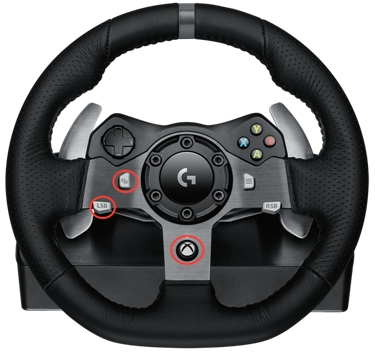
If your G920 Driving Force Racing Wheel does not respond properly upon first connection to your Xbox One console, please follow these steps:
-
Disconnect the G920's USB cable from the Xbox One.
-
Press and hold the following three buttons simultaneously:
-
LSB button
-
View button
-
Xbox button
-
-
While continuing to hold the three buttons, connect the G920's USB cable to the Xbox One.
-
Release all three buttons when the G920 wheel begins calibration.
-
Test the Directional pad (D-pad) on your G920 in the Xbox One home screen to navigate the menu items. This will confirm that the G920 is now responding properly.
|